
Labels in one click, printed from your phone
Fulfillment and shipping labels in the same system that took the order and holds the stock.
Labels
EasyPost is built in: live rate shopping across carriers, one-click label purchase, and 4×6 thermal labels printed from the carrier's native format.
- The label screen shows what the customer chose at checkout: carrier and service, expected days, the carrier cost quoted then, and what the order charged.
- Fetch rates and the customer's service is tagged “Customer's pick” and selected for you.
- It warns you when the order was edited after checkout.
- The label's origin and return address is the warehouse it ships from.
- Void and refund reconciliation, your postage wallet balance, and auto top-up alerts.
- Scheduled carrier pickups, ad-hoc shipments, and shipping costs that flow into expenses automatically.
Rates at checkout, box packing and markup are on the online store page.
Print from your phone
A built-in cloud print server: an outbound agent connects your label and document printers, so you print labels, invoices and receipts from your phone, from anywhere.
- Each document routes to its own printer — labels to the label printer, invoices to the office printer.
- PDFs are rasterized on the server, so non-PDF printers work too.
- Send the pick list to a label printer and it's laid out for 4×6 labels: large quantity boxes, one item per row, tick boxes, a clear LOCAL PICKUP banner and “label n of m”, with prices left off.
What shipping really costs
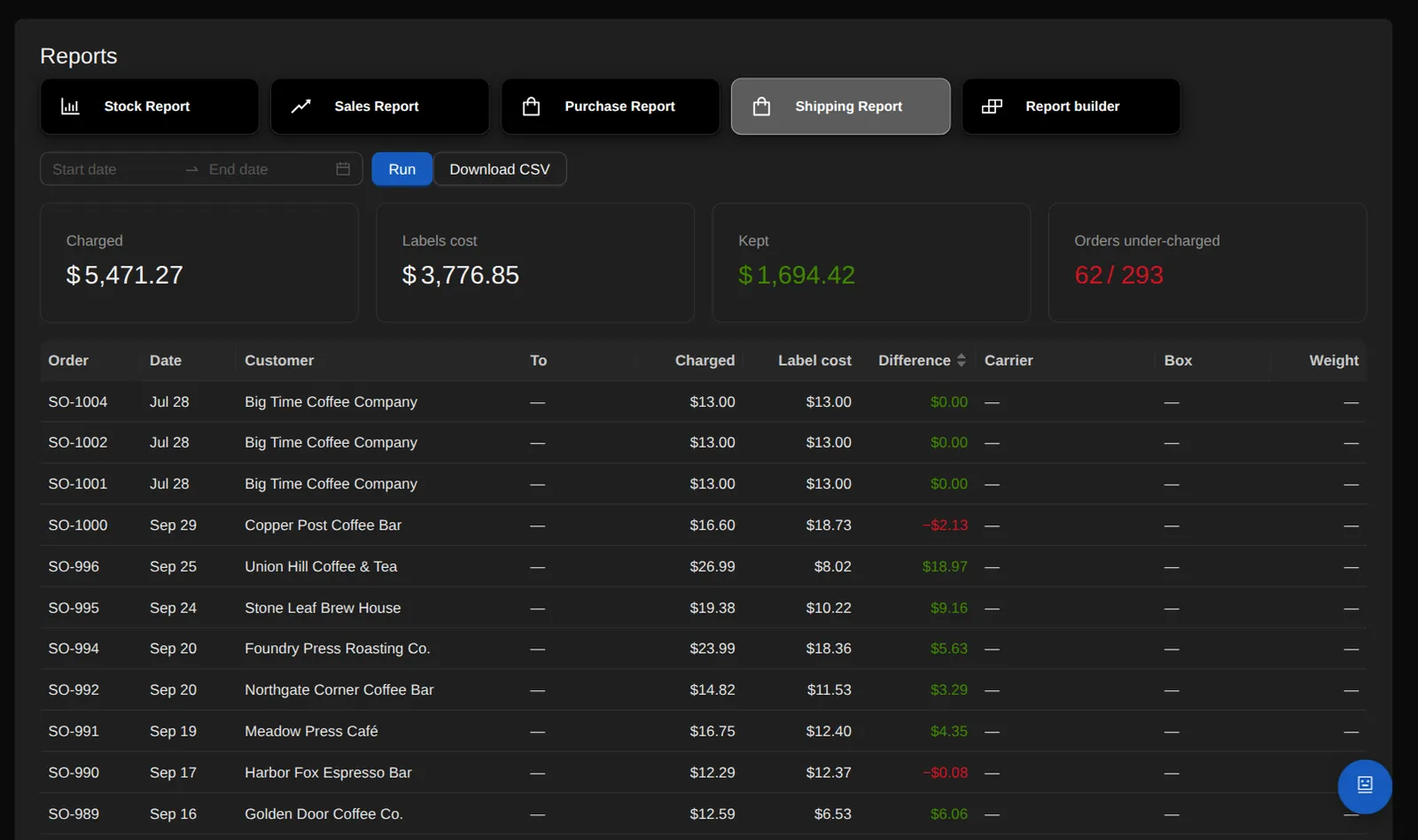
The Shipping Report shows, order by order, what you charged the customer against what the label actually cost, with an under-charged count and a CSV.
- Freight cost on an order is the sum of the labels actually bought for it — every box included, refunds excluded.
- A ready-made Shipping dashboard of 13 widgets: postage spend, labels bought, shipping margin, delivered on time, average transit in business days, delivery problems, shipping charged against label cost, label refunds, where parcels are, and more.
- On-time and transit are measured from the carrier's first scan against the delivery date the carrier promised when the label was bought.
- It's an ordinary dashboard tab: every widget can be edited, moved or removed.
- Shipping → Refunds lists voided labels whose refund the carrier rejected, or that ran past EasyPost's 30-day refund window, with the carrier's own evidence.
- OrienOS drafts the support ticket to EasyPost from EasyPost's own record — shown in full, editable, and sent when you press Send — and you can check its status and record how it ends.
Guaranteed Delivery
Guaranteed Delivery: a merchant-backed lost-in-transit guarantee your store sells at checkout.
- The fee is a set amount per $100 of merchandise after discounts, priced on the server for shipped orders.
- You can require an explicit yes or no before an order goes through, and every choice is stored as evidence: accepted or declined, the fee, the terms version, and the exact decline wording the customer saw.
- When a box goes missing, staff open a claim on the order, and a 7/14/21/30-day loss timeline runs from the carrier's last real scan. A delivered scan takes the box off the timeline.
- Claims move through ten statuses with a note history and carrier paperwork attached. An approved claim becomes a linked $0 replacement order that picks, ships and consumes stock like any other.
- Fees, replacement goods, replacement postage and carrier recoveries each book to their own account, so the guarantee's results stay separate from sales revenue, cost of goods and commissions.
- Staff can add the same guarantee to a hand-built invoice, and switching a protected order to pickup zeroes the fee and keeps the record.
Tracking and local pickup
Branded public tracking pages with a stage timeline, pre-transit to delivered, driven by carrier updates.
- Email shipping notifications.
- Tracking and password-reset links can be served from a domain you control, and OrienOS writes the proxy snippet that domain needs.
- Local pickup as a first-class path: a checkout option, a pickup queue, “mark picked up”, and pickup-ready emails.
See it on a live screen share.
The person who built OrienOS gives the demo and answers the detailed questions.
Book a demo